

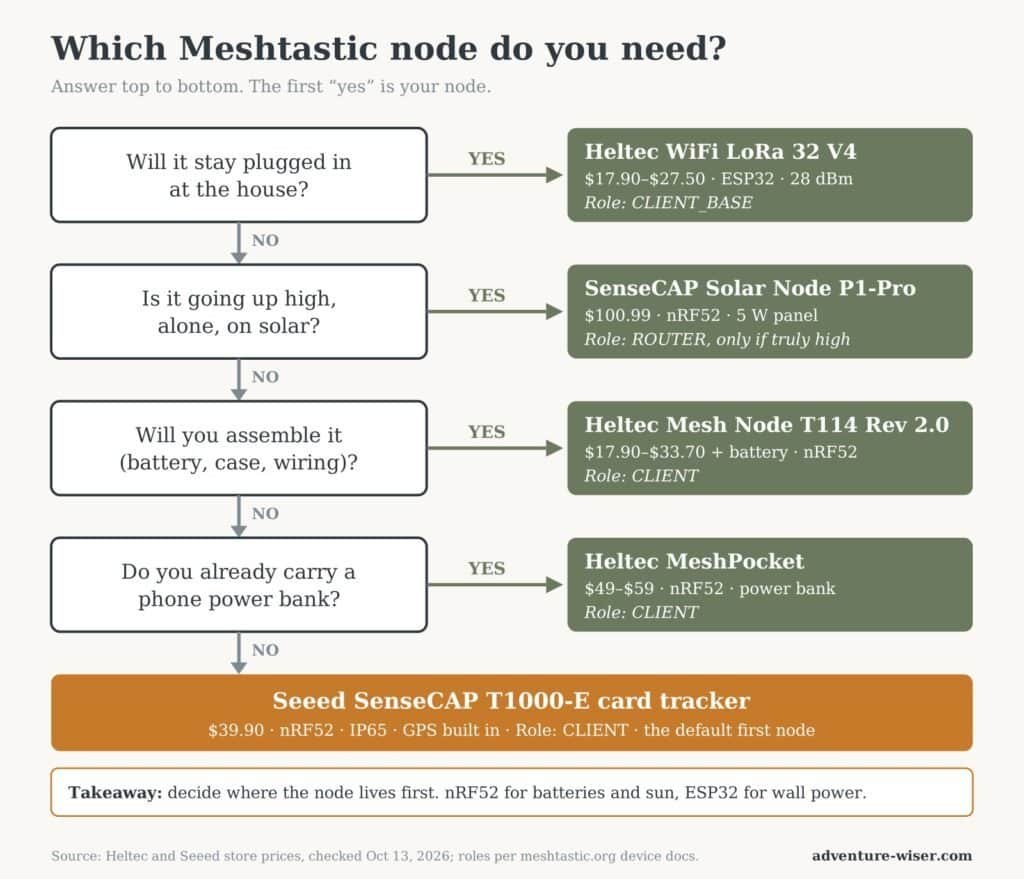
Most Meshtastic radio nodes do the same job on the same radio chip. The difference is where they live: in your pocket, on your pack, on the house, or on a ridge you’ll visit twice a year.
The first node most people buy is the wrong one. Not because it’s bad hardware. Because they bought a pocket tracker when they needed a base station, or a $20 dev board when they wanted something their spouse would actually carry. Then it goes in a drawer, and the drawer becomes the most secure part of the mesh.
The fix is boring. Decide where the node is going to live before you decide what to buy. Do that, and the choice narrows to one or two boards fast.
Here are the five I’d shortlist in October 2026, one for each job, with real prices and the flaw each one ships with.
Affiliate disclosure: some links below may earn Adventure Wiser a commission at no extra cost to you. It doesn’t change what made the list or what I say about it.
How these were picked: every node here is Researched, not Tested. I haven’t run any of them in the field yet. The picks come from manufacturer spec sheets, the official Meshtastic documentation, and owner reports, all linked. The label system is explained at the bottom of the post.
What Are the Best Meshtastic Radio Nodes?
The short version, by job:
| Node | Best for | Price (Oct 2026) | The spec that decides it |
|---|---|---|---|
| Seeed SenseCAP T1000-E | Pocket and everyday carry | $39.90 | Card-sized, IP65, GPS built in |
| Heltec Mesh Node T114 (Rev 2.0) | All-day battery handheld you build | $17.90–$33.70 | nRF52840: very low power draw |
| Heltec WiFi LoRa 32 V4 | Cheap home base station | $17.90–$27.50 | 28 dBm radio plus Wi-Fi |
| Heltec MeshPocket | People who already carry a power bank | $49–$59 | Node and phone battery in one |
| Seeed SenseCAP Solar Node P1-Pro | Solar repeater on high ground | $100.99 | 5 W panel, four 18650 cells, GPS |
Prices are from each maker’s own store, checked October 13, 2026. US resellers who stock them domestically usually charge more, because they’ve already paid the shipping and tariffs.
1. Seeed SenseCAP Card Tracker T1000-E
Best for: the node that actually gets carried.
The T1000-E is the size of a credit card and about 6.5 mm thick, with GPS, Bluetooth and the LoRa radio sealed inside an IP65 shell, per Seeed’s product page. It ships with Meshtastic loaded. You pick your region in the app and you’re on the air.
That’s the whole argument for it. The best node is the one in your pocket when the towers go quiet, and nobody leaves a 32-gram card at home.
Key Benefits
- Built on the power-sipping nRF52840 chip, which the Meshtastic hardware docs recommend for handheld and solar use
- GPS, buzzer and LED built in, so it can share position and alert you without a screen
- Dust and splash resistant out of the box. No case to print, nothing to solder
Pricing
$39.90 direct from Seeed, shipped from their US warehouse. No accessories required. A snap hook clip is a couple of dollars extra.
Pros & Cons
Pros: Smallest practical node on this list. Weatherproof. Zero assembly.
Cons: The antenna is internal, so range is modest. CNX Software lists its range at 2 to 5 km depending on the environment, and that’s the maker’s figure, not a field number. It has no screen, so it’s useless without the phone paired to it. And it charges through a proprietary magnetic cable. Lose the cable and you have a very thin paperweight, so buy a spare.
2. Heltec Mesh Node T114 (Rev 2.0)
Best for: a handheld that runs for days, if you don’t mind assembling it.
The T114 pairs the same nRF52840 chip with an SX1262 radio, an optional 1.14-inch color screen, and an optional GPS module. Heltec lists a deep-sleep draw of about 11 µA and roughly 9 mA running with the screen and GPS off. That’s why owners treat it as the efficient handheld of the Heltec line.
It also has the connectors you’d want for growing it later: a battery plug, a solar input that takes about 5 V, and a GPS port.
Key Benefits
- Low power draw for the price, on paper the best runtime per dollar here
- Screen means you can read incoming messages without unlocking your phone
- Solar input makes it a candidate for a small fixed node later
Pricing
$17.90 for the bare board up to $33.70 with display, GPS and shell, from Heltec’s store. No battery is included. Budget another few dollars for a small lithium cell with the right connector.
Pros & Cons
Pros: Cheapest nRF52 option on the list. Expandable. Good screen for the size.
Cons: It’s a kit, not a product. You’ll be choosing a battery, maybe a case, and making sure the connector polarity is right. Early units also had a documented bug sending long messages on the LongFast preset. Heltec documents the problem on its product page. Buy the current Rev 2.0 board, and check the listing says so.
3. Heltec WiFi LoRa 32 V4
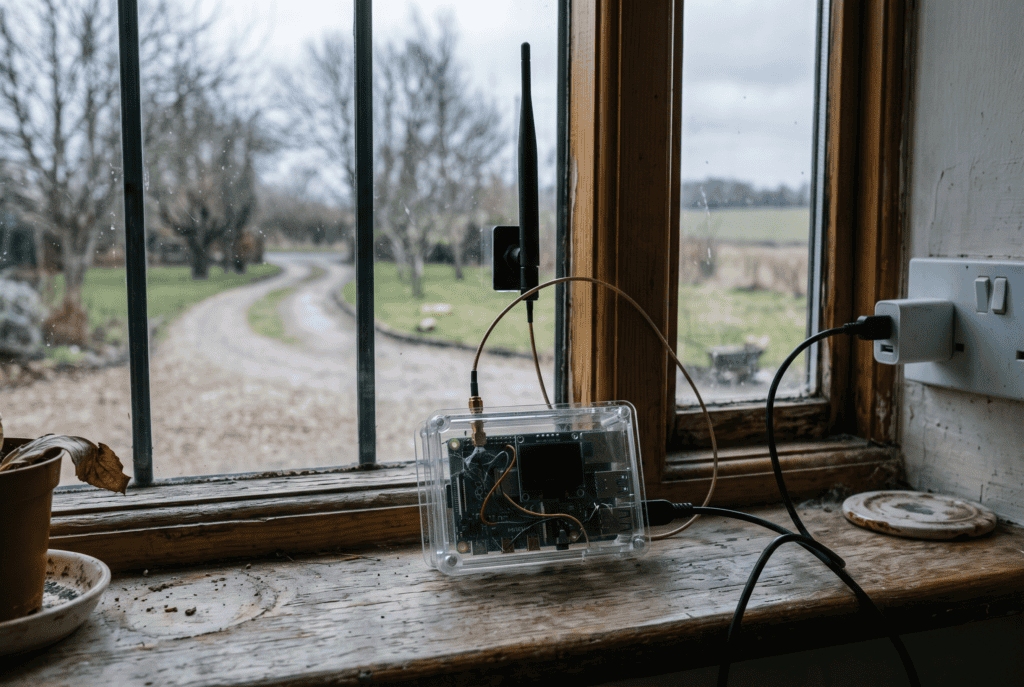
Best for: a base station on the house that stays plugged in.
The V4 is the successor to the Heltec V3, the board most people start Meshtastic on. Heltec’s V4 spec sheet lists an ESP32-S3 processor, a high-power radio rated at 28 dBm (the V3 was about 21 dBm), a dedicated solar input, a GPS port, and an OLED screen behind a protective cover.
That extra transmit power is the headline. It matters most on a node that sits high with a good antenna, which is exactly what a base station is.
Key Benefits
- The most radio for the money on this list
- Wi-Fi built in, useful for connecting a home node to the internet when there is internet. Put it on the same backup power as your router and it survives the first night of an outage; our home power redundancy guide covers that layer
- Same footprint and pinout as the V3, so most V3 guides still apply
Pricing
$17.90 to $27.50 depending on options, from Heltec. Add a battery, a case and a proper 915 MHz antenna if it’s going anywhere but a shelf.
Pros & Cons
Pros: Cheap, strong radio, huge community behind the V3 design it builds on.
Cons: ESP32 boards are hungry. The Meshtastic docs say plainly that they suit house power or handsets that only need a day or two of runtime. Don’t make this your pack node. The V4.3 revision also needs Meshtastic firmware 2.7.20 or newer, and Heltec warns not to tick the “Meshtastic UI” option in the web flasher, which is meant for touchscreen models.
4. Heltec MeshPocket
Best for: the person who already carries a battery bank and won’t carry anything else.
The MeshPocket is a magnetic Qi2 power bank with a Meshtastic node built in. Heltec’s MeshPocket page lists an nRF52840 and SX1262, a 2.13-inch e-ink screen you can read in direct sun, and either a 5,000 mAh or 10,000 mAh battery.
It snaps to the back of your phone. That’s the clever part. Your phone and your mesh radio now share one charger, one pocket and one habit.
Key Benefits
- One device does two jobs, so it’s more likely to be charged and with you
- E-ink display holds information without draining the battery
- Charges your phone wirelessly or by USB-C while running the mesh
Pricing
$49 for the 5,000 mAh version, $59 for 10,000 mAh, from Heltec. US-stocked resellers ask closer to $79.
Pros & Cons
Pros: The easiest node to get a non-hobbyist to carry. Huge battery for a node.
Cons: Heltec’s own FAQ says it currently has no waterproofing. It’s 140 to 220 grams, heavy for a radio. The antenna is internal. And one US reseller’s listing warns it can come off the phone if you move quickly, so in the field it rides in a pocket, not on your phone.
5. Seeed SenseCAP Solar Node P1-Pro
Best for: turning two radios into a network.
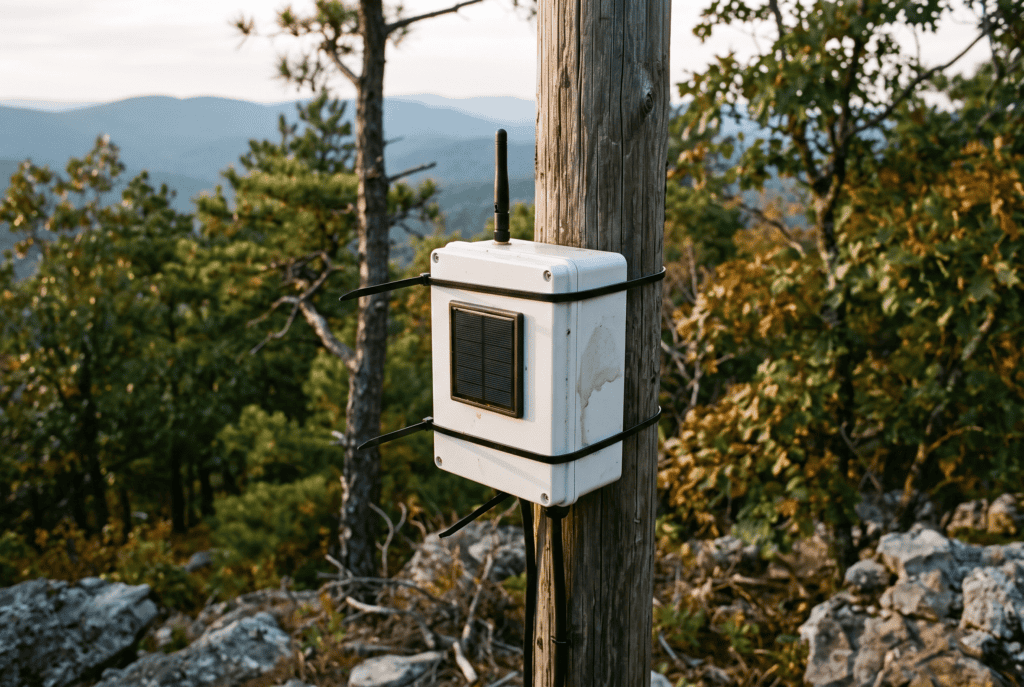
A solar node on high ground is what changes a pair of radios into a mesh. The P1-Pro is a ready-made version: an nRF52840 board, an SX1262 radio module and an L76K GPS module in a weatherproof housing with a 5 W panel and four 18650 cells, per Seeed’s P1-Pro listing.
Seeed’s resellers quote 8 to 9 km of transmission distance for the P1 line. Treat that like any range claim. Height and line of sight decide it, not the box. Pick the spot off a map before you climb anything: reading a topographic map shows you which ridge actually sees both ends of your network.
Key Benefits
- Arrives as a finished outdoor unit: panel, batteries, bracket, GPS
- Low-power nRF52 board, the right chip for running on the sun
- Grove port for adding a weather sensor later
Pricing
$100.99 direct from Seeed. The cheaper P1 drops the GPS and the batteries, which you then buy separately.
Pros & Cons
Pros: The least fiddly way to get a repeater onto a pole or a ridge.
Cons: Most expensive here. 18650 cells don’t love heat, and RobotShop’s listing gives a charging range of 0 to 50°C, which an Arkansas pole in July can push. And it’s the node most people configure wrong. More on that below.
What Is a Meshtastic Radio Node?
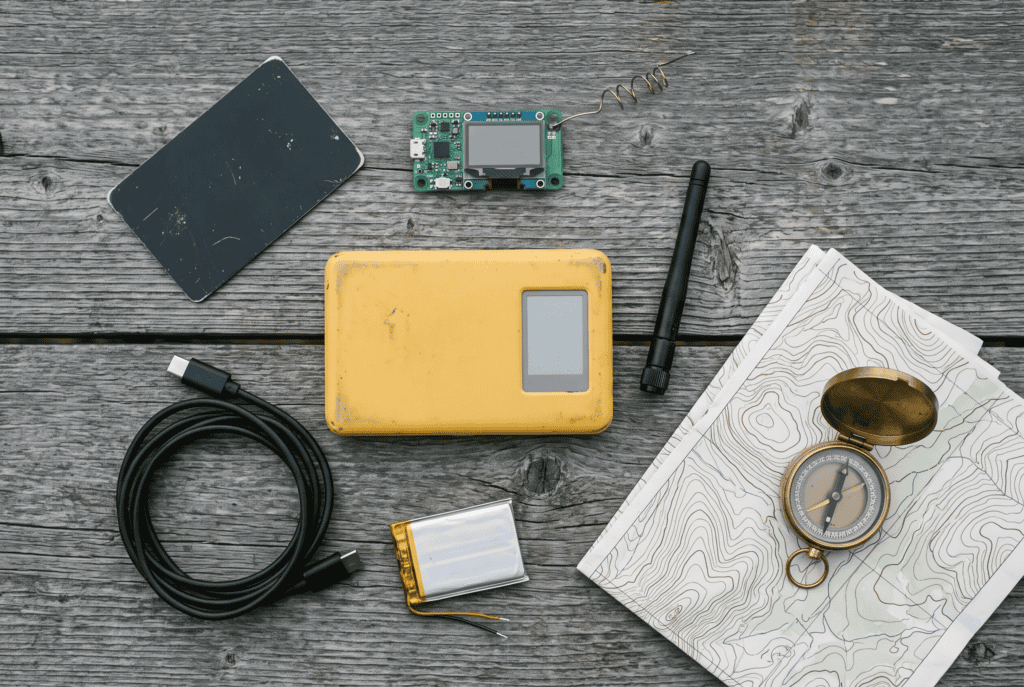
Card tracker, bare board, power bank node. Same firmware, three very different jobs. Illustrative image.
A Meshtastic node is a small LoRa radio running free, open-source firmware that sends short text messages and GPS positions without towers, internet or a subscription. You pair it to your phone over Bluetooth and type in the Meshtastic app. Every node can relay what it hears, so messages hop from radio to radio.
It’s text only, and short text at that. If you haven’t set one up yet, our guide to setting up a Meshtastic node covers the firmware, the region setting and the default encryption key nobody changes.
How Meshtastic Radio Nodes Benefit You
The real benefit isn’t range. It’s that the comms plan stops depending on the one thing most likely to fail first.
- No tower needed. When a storm takes the cell site off backhaul, the mesh doesn’t notice.
- No license. In the US it runs in the 902–928 MHz ISM band.
- It keeps working when your phone’s charger doesn’t. These radios run on milliamps.
- It’s cheap enough to buy two. You need two to test anything.
On our five levels of preparedness, this is Level 4 territory: a second way to do a critical thing. A mesh is a second way to talk.
The Mistake That Matters More Than Which Node You Buy
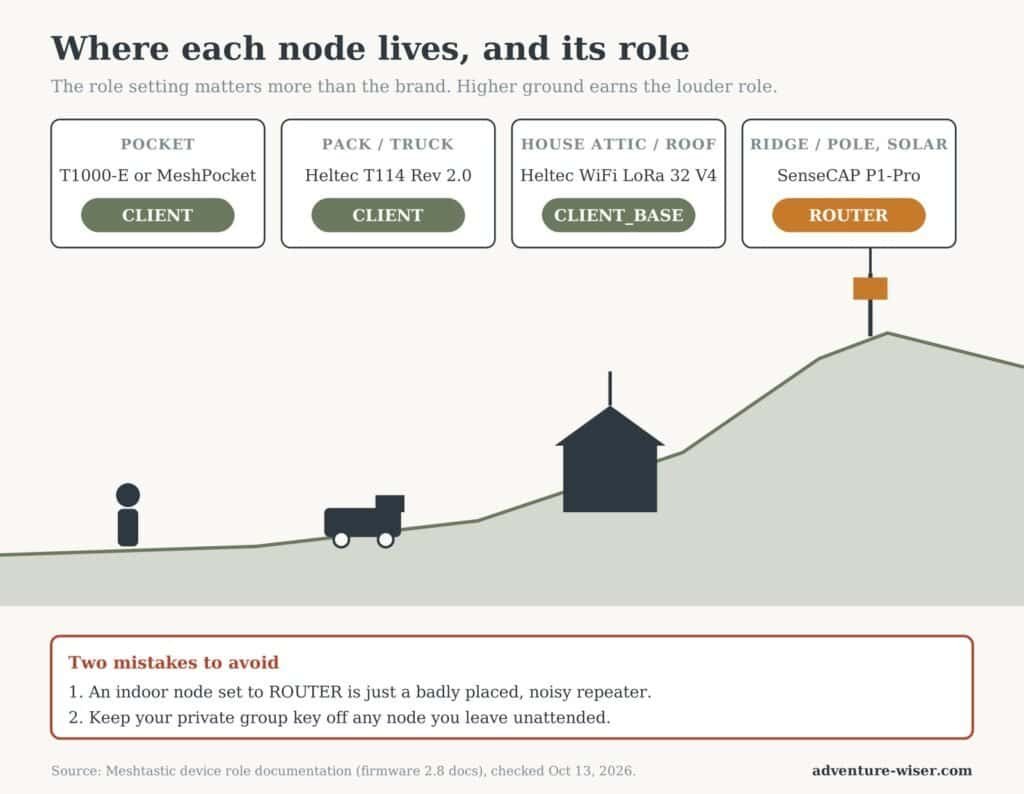
Buy the right board and you can still sabotage your mesh with one setting.
Meshtastic has device roles, and the official role documentation is clear that ROUTER is for infrastructure in a strategic spot. A router rebroadcasts everything it hears. Set the node in your kitchen drawer to ROUTER and you’ve built a loud, badly placed repeater that steps on everyone else’s traffic.
Here’s where each node on this list belongs:
- Pocket and pack nodes (T1000-E, T114, MeshPocket): leave them on CLIENT.
- Home base station (Heltec V4): the docs describe CLIENT_BASE for a stronger attic or roof node that serves your own weaker nodes. That’s this job.
- Ridge or pole node (P1-Pro): this is the one place ROUTER makes sense, and only if it genuinely sits high with a clear view.
Higher ground earns the louder role. Everything you carry stays on CLIENT.
One more rule from our setup guide, worth repeating for the solar node: never put your private group key on an unattended node. A repeater relays traffic fine without it, and anyone who finds it can pull the key off the hardware.
Buyers Guide: How We Conducted Our Research
These are spec-and-documentation picks, so here’s exactly what we weighed.
- Pricing: what it costs from the maker, and what it costs to make it usable. A $17.90 board that needs a battery, case and antenna is a $40 node.
- Features: chip family first. nRF52 for anything on a battery or the sun, ESP32 for anything plugged in, per the Meshtastic hardware docs.
- Negatives: at least one real flaw per node, from maker FAQs and documented firmware issues.
- Support: both Heltec and Seeed are on the Meshtastic project’s supported hardware list, which means firmware builds keep coming.
- AW criteria: weather resistance, whether someone who isn’t a hobbyist would carry it, and whether it still works when the phone is dead.
That last one matters more than people think. Only the T114 and V4 have screens that show messages without a phone, and none of these five has a keyboard. If a node that works with no phone at all is the requirement, look at the LILYGO T-Deck Plus we covered in what to do when your phone dies in the field.
What Didn’t Make the Cut
RAK WisBlock starter kit. Excellent low-power modular hardware and a long-time community favorite. It’s a builder’s platform, though, and this list leans toward things you can carry this month. Station G2. A serious base-station radio for people already deep in the hobby. Heltec V3. Still fine, but the V4 replaced it at a similar price.
Frequently Asked Questions
Which Meshtastic radio nodes are best for beginners? The Seeed T1000-E. It arrives with Meshtastic installed, needs no assembly and is weatherproof. Pair it with a Heltec V4 at the house and you have a complete starter setup.
Do Meshtastic nodes need a license? No. In the US they use the license-free 902–928 MHz ISM band. Make sure the hardware covers 902–928 MHz, since some boards are still sold in separate 868 MHz European versions.
How far can a Meshtastic node reach? Expect a few kilometers handheld to handheld in hilly, wooded country, and much more from height with line of sight. The published records are mountaintop to mountaintop. Antenna and elevation matter more than the node.
What’s the difference between nRF52 and ESP32 nodes? nRF52 boards use far less power, so they suit handhelds and solar. ESP32 boards are cheaper and add Wi-Fi but drain batteries faster, so they suit plugged-in base stations.
Can Meshtastic nodes talk to each other across brands? Yes. A Heltec and a Seeed node mesh together fine as long as they run Meshtastic with the same region and preset. They can’t talk to MeshCore nodes.
How many Meshtastic nodes do I need? Two minimum, so you can test. A useful network usually means two carried nodes, one home base and one node on high ground.
Wrapping Up: The Meshtastic Radio Nodes I’d Buy First
If you’re buying one, buy the Seeed T1000-E. It’s the node most likely to be on you when it counts.
If you’re on a budget, buy two Heltec WiFi LoRa 32 V4 boards. One goes on the house with a decent antenna. The other goes to whoever you most need to reach.
None of these Meshtastic radio nodes is a full comms plan. They carry text between people who both prepared. For reaching help, our backcountry communications hub lays out where mesh fits next to GMRS, ham and satellite. And when you send a position by hand, a six-digit MGRS grid is far shorter over a slow link than a lat/long pair.
Here’s your move this week: pull up a Meshtastic coverage map for your county before you buy anything. If there’s a mesh, buy one T1000-E and join it. If there isn’t, buy two nodes, put one up high, and drive until the messages stop. Then grab the free preparedness checklist and add the result to your comms plan.
Gear on Adventure Wiser is labeled for what it is: Tested, Owned, or Researched. Here’s how that works.