

Two radios, one repeater, and a whole lot of silence. Here’s what actually goes wrong.
You bought the radios in March. They’ve been in the closet since. Now there’s a family trip in three weeks, or a storm season starting, or a neighborhood group that wants everyone on the same channel — and you’ve realized that the twenty-two channels the radio came with are not the same thing as a radio that’s ready to use.
Learning how to program a GMRS radio takes an afternoon, costs about the price of lunch if you already own the radio, and eliminates the single most common failure in family radio: two people standing a mile apart, both transmitting, neither one heard.
Most days it’s nothing. You key up, someone answers, everyone goes back to what they were doing. The day it isn’t nothing is the day the repeater matters, and the repeater is the part almost everyone gets wrong.
Adventure Wiser earns a commission on some links in this post at no extra cost to you. We only link to gear we’d point a friend at.
What It Actually Means To Program a GMRS Radio
Before anyone can explain how to program a GMRS radio, it’s worth being precise about what the word covers. Out of the box, a GMRS handheld can talk on the twenty-two standard simplex channels. That’s radio-to-radio, line of sight, and the gap between the box and the woods is enormous: handhelds are commonly advertised at around 35 miles, the honest figure in forest is one to three, and earth curvature caps handheld line-of-sight at roughly 3.6 miles regardless of how much power you run. More detail on why in the backcountry communications guide.
Programming is the process of writing a channel list into the radio’s memory — names, frequencies, tones, power levels, and bandwidth — so the radio does the right thing when you turn the knob instead of making you remember settings under pressure. It’s also how you add repeaters, which are the only way a five-watt handheld reaches across a county.
So when people ask how to program a GMRS radio, three things live in every programmed channel: what you receive on, what you transmit on, and what tone you send so the far end knows you’re allowed in. Get any one wrong and the radio behaves exactly like a broken radio.
Why Learning How To Program a GMRS Radio Is Worth an Afternoon
- Repeaters are unusable without it. Every repeater has its own tone. None of them are standard.
- Named channels beat numbered ones. “MENA RPTR” under stress beats “Channel 17.”
- Fleet consistency. If your spouse’s radio has channel 14 as something different from yours, you don’t have a radio system, you have two radios.
- Battery life. Per-channel power settings mean you’re not burning five watts to reach someone across the campsite.
- It’s the difference between gear and capability. The radio in the closet is inventory. The programmed radio is a plan.
If you haven’t bought yet, sort which handheld is actually worth the money first — programming a radio you’ll replace in six months is wasted effort.
The method below front-loads the two steps that save money, then walks the ones people botch. Nobody explains how to program a GMRS radio when you buy one — the manual assumes you already know.
Step-by-Step: How To Program a GMRS Radio
Eight steps, roughly two hours the first time and twenty minutes every time after. The order matters — steps 1 and 2 exist to keep you from buying the wrong cable or wiping a radio you hadn’t backed up.
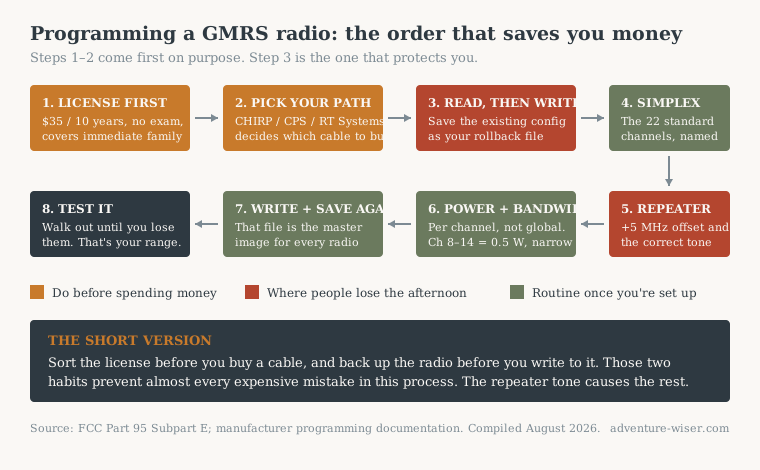
Use this chart: republish freely with attribution and a link to adventure-wiser.com.
Step 1 — Get the License Before You Buy Anything Else
Do this first because it takes ten minutes and it changes what you’re allowed to program. Anyone working out how to program a GMRS radio should sort the paperwork before the software.
GMRS licensing runs $35 for ten years with no exam, and one license covers your entire immediate family under FCC rule 95.1705. There’s no test to study for. You apply, you get a callsign, you’re done.
Why it comes before the cable: an unlicensed operator programming repeater channels is programming channels they can’t legally key up on. Sort the license, then build the channel list around what you can actually use. The service rules themselves live in 47 C.F.R. Part 95 Subpart E if you want the power and bandwidth limits in their original language — linked from the FCC page above.
Step 2 — Pick Your Programming Path Before Buying a Cable
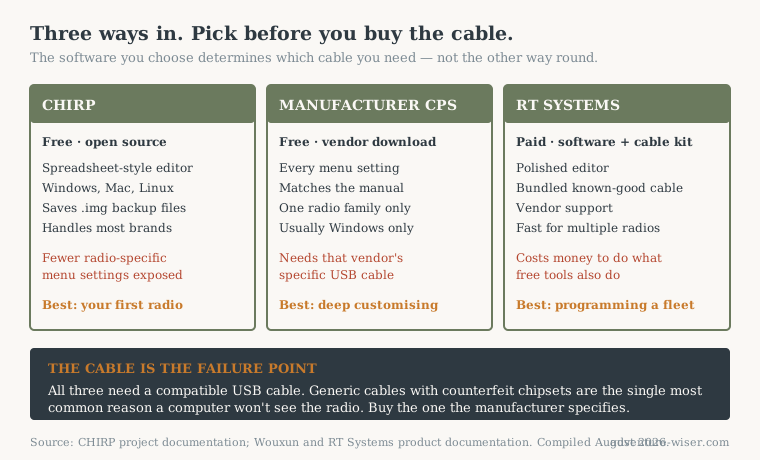
There are three ways in to program a GMRS radio, and buying the wrong cable is the most common twenty dollars wasted in this hobby. Every method of how to program a GMRS radio depends on the computer seeing the radio first.
The Wouxun KG-UV9GX+ is a useful worked example because it supports all three. Wouxun’s free Customer Programming Software needs the compatible “red” PCO-009 USB cable specifically, sold through BetterSafeRadio alongside the radio. The radio is also compatible with CHIRP, the free open-source programming tool, using the UV9GX driver, and there’s a premium RT Systems UV9G software and cable kit for people who want a more polished editor.
Use this chart: republish freely with attribution and a link to adventure-wiser.com.
Pick by what you’re doing. Free CHIRP if you’re programming a couple of radios and comfortable with a spreadsheet. Manufacturer CPS if you want access to every menu setting the radio has. RT Systems if you’re programming a fleet and want the time back.
The cable is the part that bites people: generic cables with counterfeit chipsets are the number one cause of “my computer won’t see the radio.” Buy the cable the manufacturer specifies, from the dealer selling the radio.
Step 3 — Read From the Radio Before You Write To It
This is the step that separates a bad afternoon from a very bad afternoon, and it’s the one most guides on how to program a GMRS radio leave out entirely.
Whatever software you’re using, download the radio’s current configuration first, then save that file somewhere safe. In CHIRP that’s a `.img` file. It’s your rollback. If you write a bad channel list, or the write fails halfway, that file puts the radio back exactly how it was.
Do this even on a brand new radio. Radios that ship pre-programmed — and the UV9GX+ ships with a substantial default channel set — arrive with work already done that you may want back later.
Step 4 — Build the Simplex Channels
Start with the twenty-two standard channels, because they’re the ones you’ll actually use ninety percent of the time.
Two rules that trip people up. Channels 8 through 14 are limited to half a watt and narrowband only — those are shared FRS interstitial channels and the power limit is a rule, not a suggestion. Channels 1 through 7 and 15 through 22 allow wide FM and full power.
Name them as you go. “CAMP”, “TRUCK”, “NWS” — whatever you’ll recognize at 2 a.m. with cold hands. Add the NOAA weather channels while you’re in there; they pair naturally with the crank radio sitting in your kit, which receives the same alerts but can’t ask anyone a question.
Step 5 — Program a Repeater (The One Everybody Gets Wrong)
Here’s the step where most people learning how to program a GMRS radio quietly give up and conclude their radio is defective.
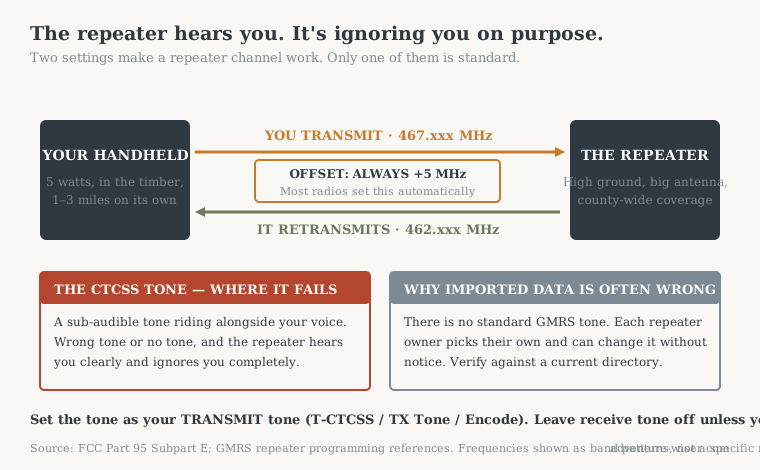
A GMRS repeater listens on one frequency and transmits on another. The offset is always plus 5 MHz on GMRS — you receive on 462.xxx and transmit on 467.xxx. Most radios handle this automatically when you pick a repeater channel; if you’re entering it manually, set the transmit frequency to the repeater channel and the receive to the standard one.
Then the part that actually causes the silence: most repeaters require a CTCSS tone or DCS code, and without the correct one the repeater ignores you completely even though it hears you perfectly. That’s deliberate — it stops the repeater triggering on noise and distant traffic.
Use this chart: republish freely with attribution and a link to adventure-wiser.com.
There is no standard tone. GMRS and FRS tones are set by the individual repeater owner and change without notice, so imported repeater data is wrong at least as often as it’s right. Look up the tone in a repeater directory such as myGMRS, program it as your transmit tone — labelled T-CTCSS, TX Tone, or Encode depending on the software — and leave the receive tone alone unless you specifically want to filter out other traffic.
One more thing worth knowing before you spend an evening on this: not every repeater is open. Open repeaters welcome any licensed GMRS user and are the ones listed publicly. Closed repeaters belong to a family, club, or business, may use an unlisted tone, and are not yours to use without asking.
Step 6 — Set Power and Bandwidth Per Channel
Most software lets you set these per channel rather than globally, and most people never touch them.
The UV9GX+ offers three programmable power levels — 5.5, 2, and 0.5 watts — which exist precisely so you can run low power where FRS compatibility requires it and save battery on short-range channels. Set the mandatory half-watt on 8 through 14, high power on your repeater channels, and low or medium on the camp channels where everyone’s within shouting distance anyway.
Step 7 — Write It, Then Save the File Again
Write the new configuration to the radio, then immediately save a second copy of the file with a name you’ll recognize in a year.
That file is now the master image for every radio in your group. It’s also something worth keeping in your digital go bag alongside your other critical documents — a radio configuration is exactly the kind of thing that’s trivially replaceable until the day it isn’t.
Step 8 — Test It Before You Need It
Two tests, both quick. Knowing how to program a GMRS radio means nothing until you’ve confirmed the programming works at distance.
Simplex: hand a radio to someone, walk until you lose them, note the distance. That number is your real range, not the one on the box, and it’s usually a fraction of it.
Repeater: key up and listen for the repeater’s tail — the brief burst of noise after you unkey. If you hear it, you’re in. If you hear nothing, your tone is wrong, and the tone is wrong far more often than the frequency is.
Key Considerations Before You Program a GMRS Radio
Three things worth settling before you start on how to program a GMRS radio for a whole household.
Program every radio in the group from the same file. A channel list is only useful if everyone’s channel 17 is the same channel 17. Write once, clone to all.
Repeater directories go stale. Tones and callsigns change, repeaters go offline, and nobody updates the listing. Re-verify before a trip that depends on one.
Part 95E compliance is designed in. GMRS-certified radios like the UV9GX+ ship with transmit locked to the GMRS band. That restriction is the certification. Software that offers to remove it is offering to make your radio non-compliant.
Taking It Further: Cloning a Family Fleet
Once one radio is right, the rest are copies. Read the good radio, save the image, write that image to each remaining radio. Ten minutes per handset. Then label them physically — a strip of tape with the operator’s name saves more confusion than any menu setting.
Alternatives to Computer Programming
Front-panel programming works and needs no cable, but it’s slow, error-prone on repeater channels, and unpleasant on a small keypad. Fine for adding one channel in the field. Miserable for building a list from scratch.
If you want more reach than GMRS allows, that road runs through a Technician licence and an amateur handheld. And where there’s no repeater at all — most of the Ouachitas — a mesh node solves a different half of the problem.
Pre-programmed radios are the other option — dealers like BetterSafeRadio ship theirs with a substantial GMRS and scanner channel set already loaded, which genuinely gets you usable out of the box. You’ll still want the cable eventually, because local repeaters aren’t something a factory can know about.
Frequently Asked Questions
How long does it take to learn how to program a GMRS radio? About two hours the first time, twenty minutes every time after. The licence takes ten minutes, the cable is a shipping wait, and the channel list itself is just a spreadsheet.
Do I need a license to program a GMRS radio? You can program one without a license, but you can’t legally transmit. At $35 for ten years covering your whole immediate family with no exam, there’s no good reason to skip it.
Why can’t I hear anything through the repeater? Almost always the CTCSS tone. The repeater hears you fine and ignores you on purpose. Verify the tone in a current directory rather than trusting imported data.
What offset do GMRS repeaters use? Always +5 MHz. Receive on 462.xxx, transmit on 467.xxx. Most radios apply this automatically on repeater channels.
Is CHIRP good enough, or do I need paid software? CHIRP is genuinely good and free. Manufacturer software exposes more radio-specific settings; paid options like RT Systems mainly buy you a better editor. Start free.
Why won’t my computer see the radio? Cable, nine times out of ten — generic cables with counterfeit chipsets. After that, wrong COM port, or the radio isn’t in programming mode. Unplug, reconnect, re-check the port.
Can I program FRS channels to higher power? No. Channels 8 through 14 are limited to half a watt and narrowband. That’s a rule, and exceeding it is both illegal and pointless — those channels are physically limited by design.
How We Know This
The licensing figures, power limits and bandwidth rules come from FCC Part 95 Subpart E and the FCC’s own GMRS licensing pages. The programming paths, cable requirements and power levels come from published manufacturer documentation for the radios named, not from our own bench testing.
The range figures are the important caveat. The one-to-three-mile forest number is a general field-reported range for handhelds in timber and the 3.6-mile line-of-sight ceiling is derived from earth curvature at handheld antenna height — both are published figures and physics, not measurements we took with these specific radios. Adventure Wiser has not field-tested the Wouxun 9-series; it appears here as a worked example because it supports all three programming paths, which makes it useful for showing the process.
Checked August 2026. Repeater tones and directory listings change without notice — verify locally before a trip that depends on one.
Wrapping Up
The radio isn’t the capability. The programmed radio is.
That’s the whole argument for learning how to program a GMRS radio rather than leaving it on factory defaults in a closet.
Set aside two hours this week. Get the license first, order the right cable second, and read from the radio before you write to it. Everything after that is a spreadsheet.
If you’re still deciding which handheld to buy before any of this matters, start with the guide to choosing between GMRS, FRS and ham — it walks the choice between GMRS, FRS, and ham before you spend money on any of them. And if you want the rest of the preparedness fundamentals in order, the free 30-day plan covers the ground this post assumes you’ve already got.
Adventure Wiser tests gear in the field before it goes on the site. If it doesn’t hold up on the trail, it doesn’t make the cut.
